Showing posts with label Hide. Show all posts

Friday, 1 February 2013

HIDE DATA FOLDER IN MOBILE WITHOUT ANY SOFTWARE


JUST FOLLOW SIMPLE STEPS
1. Create any new folder or you can use any existing folder that is to be hidden.
2. Rename the folder to any name but with the extension of .jad like if I want to hide my images folder then I will name it as IMG.jad
3. Now create a new folder with the same name in the same directory but with the extension of .jar So, I would create the folder with the name IMG.jar
4. And thats it!! My orignal images folder which has been renamed with .jad gets hidden and only folder with.jar extension is visible which is empty.So,my data is protected/hidden from unwanted eyes.

Note :This trick can be used for any JAVA phone from Nokia,Samsung,Motorola,LG or any other company.
To unhide the orignal folder you have to remove the .jar extension from the new folder and your orignal folder with all the files and with .jad will become visible.
Read more ...

Friday, 18 January 2013

Real Hide IP 4.2.7.2


Use Real Hide IP to surf anonymously, prevent hackers from monitoring your online activities or identity thieves from stealing your identity and other personal information, send anonymous email, and un-ban yourself from forums or restricted websites.

Protect your privacy on the Internet. With Real Hide IP, you can conceal your real IP address, surf anonymously, send anonymous emails through any web based mail system, un-ban yourself from forums or restricted websites, keeping your personal information safe from hackers and identity thieves.

Real Hide IP enables you to be assigned one of our fake IP addresses which can be from different countries such as United States, United Kingdom, France, etc. It works with Internet Explorer, Firefox, Opera, Maxthon, MyIE and is compatible with all types of routers, firewalls, home networks, wireless networks and any other kind of Internet.

Key Features
Hide Your Real IP Address
Be assigned fake IP addresses from different countries to conceal your real IP.
Anonymous Web Surfing
Surf anonymously with fake IP, whenever you want to.
Protect Your Identity Against Hackers
Protect you from hackers and identity thieves who will be tricked by your fake IP.
Un-ban Yourself from Forums or Restricted Websites
Real Hide IP allows you to access any forums, blogs or websites that have ever banned you.
Prevent Websites from Tracking Your Online Activities
Hide your real IP when you are surfing the Internet to prevent you from being tracked by websites.

Home Page - www.real-hide-ip.com/products/real-hide-ip.html

Download :
Real Hide IP 4.2.7.2
Read more ...

Monday, 19 November 2012

Hide File in Picture


In order to accomplish this task, you will need to have either WinZip or WinRAR installed on your computer. You can download either of these two off the Internet and use them without having to pay anything. Here are the steps for creating your hidden stash:
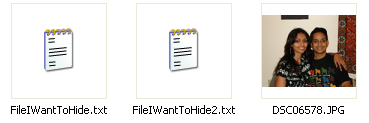
  • Create a folder on your hard drive, i.e. C:\Test and put in all of the files that you want to hide into that folder. Also, place the image that you will be using to hide the files in.
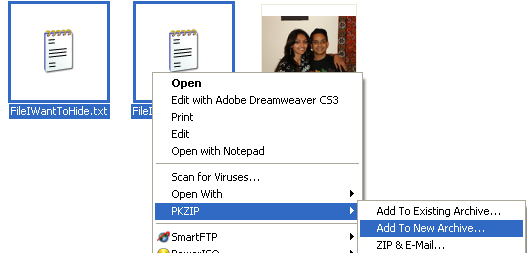
  • Now select all of the files that you want to hide, right-click on them, and choose the option to add them to a compressed ZIP or RAR file. Only select the files you want to hide, not the picture. Name it whatever you want, i,e. “Hidden.rar”.
  • Now you should have a folder that looks something like this with files, a JPG image, and a compressed archive:
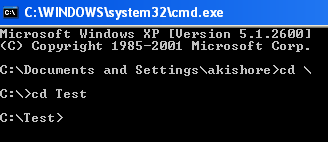
  • Now here’s the fun part! Click on Start, and then click on Run. Type in “CMD” without the quotes and press Enter. You should now see the command prompt window open. Type in “CD \” to get to the root directory. Then type CD and the directory name that you created, i.e. “CD Test“.
  • Now type in the following line: “copy /b DSC06578.JPG + Hidden.rar DSC06578.jpg” and press Enter. Do not use the quotes. You should get a response like below:
Just make sure that you check the file extension on the compressed file, whether it is .ZIP or .RAR as you have to type out the entire file name with extension in the command. I have heard that some people say that they have had problems doing this with a .ZIP extension, so if that doesn’t work, make sure to compress to a .RAR file.
And that’s it! The picture file will have been updated with the compressed archive inside! You can actually check the file size of the picture and see that it has increased by the same amount as the size of the archive.
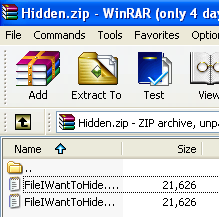
You can access your hidden file in two ways. Firstly, simply change the extension to .RAR and open the file using WinRAR. Secondly, you can just right-click on the JPGimage and choose Open With and then scroll down to WinRAR. Either way, you’ll see your hidden files show up that you can then extract out.
That’s it! That is all it takes to hide files inside JPG picture files! It’s a great way simply because not many people know it’s possible and no one even thinks about a picture as having to the ability to “hide” files. Enjoy!
Read more ...

Sunday, 18 November 2012

Trick to Hide folders in Nokia/java phones without using any software

Hii friends.....I hope you all are fine. Sometimes we have some personal data in our phone and we want to hide it without using any software. So today am going to share a very useful trick "Hide folders in NOKIA/Java Phones without using any software". This trick will work on LG,NOKIA,SAMSUNG and most of the companies. The only requirement is your phone should support JAVA which almost all mobile phones support now.


Steps:   

  • Create any new folder or you can use an existing folder that you want to hide.
  • Now give that folder any name but with the extension of .jad like if I want to hide my games folder then I will give name as games.jad
  • Now you have to create a new folder in the same directory and with the same name but with the extension of .jar 
    Here, I will create a new folder with the name games.jar
  • Yippee!!You are done!! The original games folder has been hidden and now the folder visible is games.jar which is an empty folder. To view games folder that is to see our protected data,we need to remove the .jar extension from the games.jar and my original folder with my protected files and .jad extension will be visible. 
So, now we have learnt to save our personal data from unwanted eyes!!!

I hope my article was useful to you!!!
Please do comments on this post!!!
Keep Visiting!!!
Read more ...

Tuesday, 13 November 2012

Giveaway !!! Auto Hide IP 5.2.8.2 Full Download


Hi all users, did you know your IP address is exposed every time you visit a website? Your IP address is your online identity and could be used by hackers to break into your computer, steal personal information, or commit other crimes against you. Real Hide IP allows you to surf anonymously, change your IP address, prevent identity theft, and guard against hacker intrusions, all with the click of a button.

Key Features :

  • Easily Conceal Your IP Address
  • Anonymous Web Surfing
  • Advanced Application Support
  • Protect Your Identity and Stop Hackers
  • Un-ban Yourself From Forums, Blogs, Etc...
  • Prevent websites from tracking your online activities
  • Quickly delete all Internet Explorer and FireFox cookies
  • Automatically clear your cookies each time your IP changes

OS : Win XP/2000/Vista/Win 7
Language : English

Download :
Read more ...

Saturday, 15 September 2012

Hide files in JPG files


Watch the Video...


Hide files in JPG files 
Read more ...

How to Hide Files Smartly...

Now I am going to give you a Exclusive trick to hide your Secret Files/docs which you want to keep away from others eye. For this, the only thing you have to do is to follow these simple steps :-


  1. Add your files to WinRAR or archive your files/folder to filename.rar
  2. Now, you have to change the extension of the archive file (.rar) to any extension (.docx, .xls, .bmp, .jpg, .mp3 etc.)
  3. As you change the extension the icon of the archive file changes accordingly.
  4. Now, If you want to rename file then, rename it otherwise you are done.
  5. You can put this file anywhere like desktop, my document etc., when others open it they were given a message that the file is broken or something like that.
  6. When You want to open the file, you have to just change the extension to filename.rar
Enjoy keeping your files...
Read more ...
Related Posts Plugin for WordPress, Blogger...